Where is this measure used?
How to find every visual, page and report that uses a column or measure, across all the reports built on a semantic model, before you change or delete it.
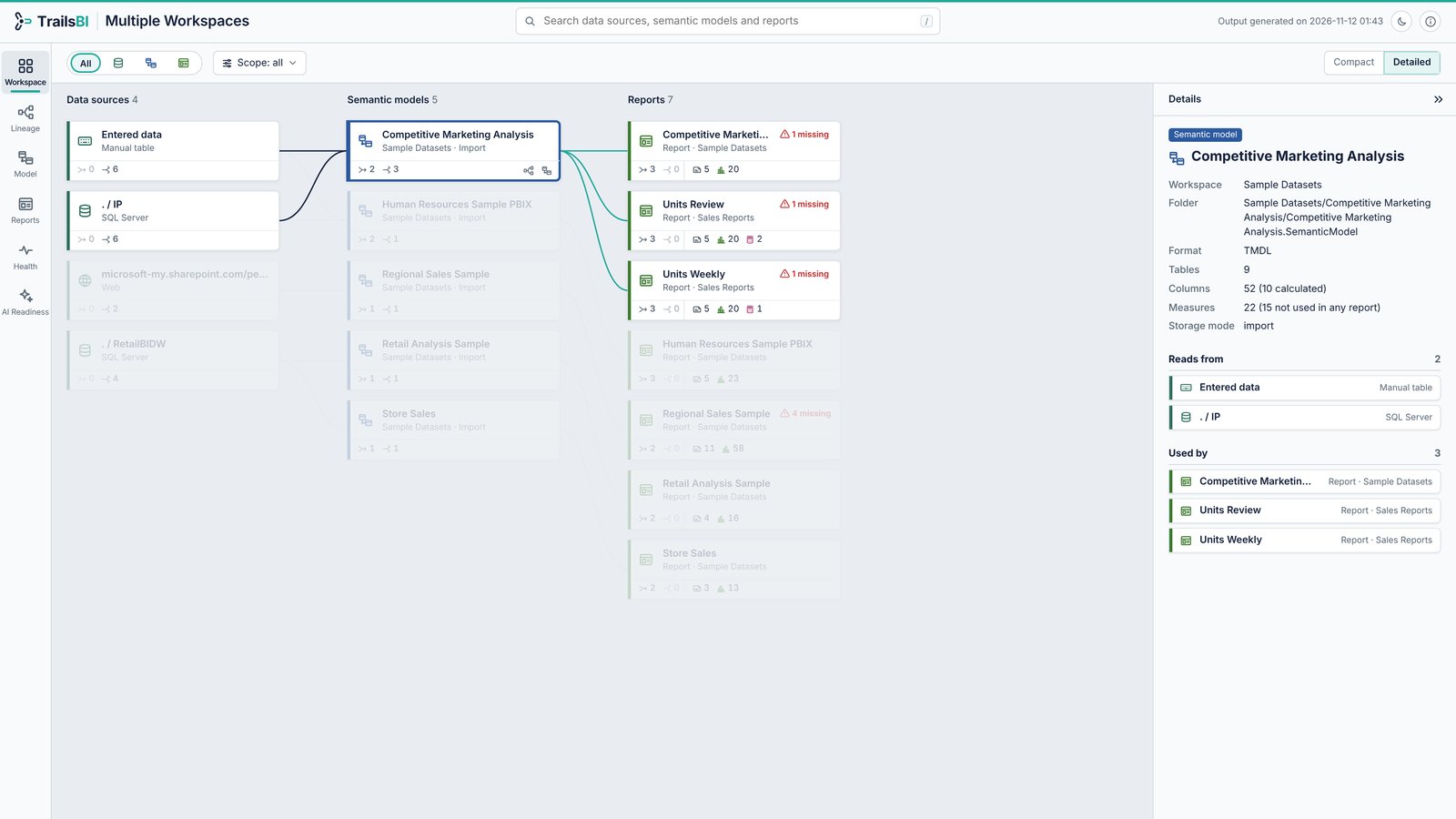
- The data sources the semantic model reads.
- The semantic model you picked.
- Every report that uses it, in any workspace folder you gave TrailsBI, with a warning where a visual has a missing field.
- The details: workspace, format, and how many measures no report uses.
Why Power BI can't tell you
Power BI's lineage view works with whole items. It shows which reports and dashboards connect to a semantic model, not which visuals use a particular column or measure.2 Impact analysis gives you a count of the workspaces, reports and dashboards that might be affected by a change. It needs write permission on the model, and it can't follow a model that lives in another workspace.1
So the answer people get on the forums is usually some version of this:
“This is not possible natively in the Power BI Service. In the Power BI Service, you may use the Lineage functionality inside a Workspace to see which data sources feed into which reports, but it will only go as far as to Data Source level, not table/column level, and it will not work across workspaces.”
Accepted answer by an MVP, Fabric Community, March 2024. Read the thread
The request to list where a column or measure is used had 1,006 votes on Microsoft's ideas forum in November 2026, and has been open for about ten years.3 Until then, the fallback is opening every report, or waiting to see who complains:
“Do you know if there's a way to see which reports use which measures? Otherwise, it might just be a wait to see who screams kind of deal.”
r/PowerBI, January 2026. Read the thread
How to find it with TrailsBI
TrailsBI reads the Power BI project files themselves (TMDL for the model, PBIR for the reports), so it can follow a field from the data source to every visual that uses it, across reports.
- Save the model and its reports as Power BI projects (File, Save as, Power BI project), or use the Git folders your workspaces sync to.
- Point TrailsBI at the folder that holds them. It writes one HTML page.
trailsbi "D:\Git\Sales workspace" - Search for the column or measure and select it. The Lineage view shows what it depends on, then every visual and page that uses it.
For a big folder, list what it holds and build only the model you care about, with every report that uses it:
trailsbi "D:\Git\Sales workspace" --model "Sales*" --with-reportsWhat it doesn't see
- Reports that aren't saved as Power BI projects in the folders you give it.
- Excel workbooks, paginated reports and Analyze in Excel connections.
- Usage: TrailsBI tells you what references a field, not how often anyone opens the report.
Questions
If a measure is only used inside another measure, does it count as used?
Yes. TrailsBI follows DAX dependencies all the way to the visuals, so a measure that feeds a measure on a visual is shown as used, with the chain that uses it.
Does it see measures added in live-connected reports?
Yes. Report-level measures in thin reports are tracked and shown apart from the model's own measures.
Do I need access to the Power BI service or admin rights?
No. TrailsBI reads the project files on your machine. No sign-in, no tenant admin, no workspace permissions, no XMLA endpoint.
Can it check reports in other workspaces?
Yes, if you give it their folders. A report finds its model by name and by the workspace its connection names, so a Dev and a Prod copy of the same model are told apart: trailsbi "D:\Git\Sales Reports" "D:\Git\Sales Datasets".