How do I get column-level lineage in Power BI?
How to trace a column or measure from its data source, through the tables and measures that use it, to every visual and page, without admin rights, a catalog or the Power BI service.
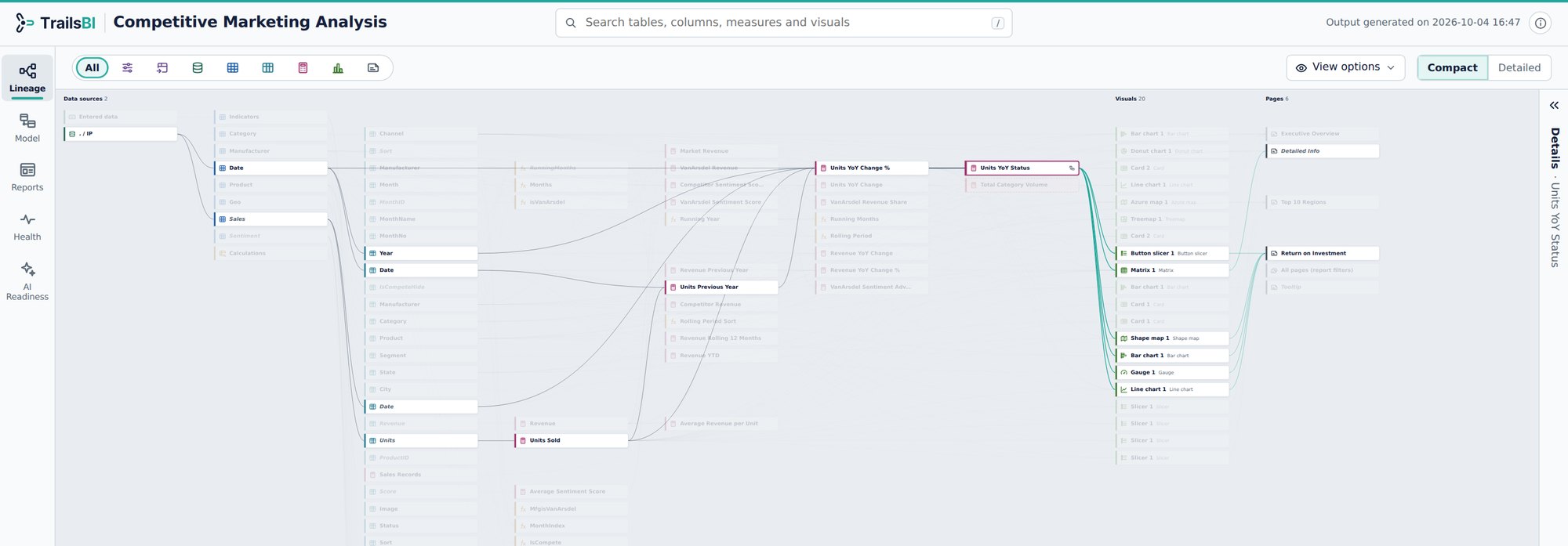
- The data source, then the tables, columns and measures the measure reads.
- The selected measure.
- The visuals and pages that use it.
What Power BI and Purview show
The lineage view in the Power BI service shows items: data sources, semantic models, reports and dashboards, and the lines between them. It doesn't go down to tables, columns or visuals.1
“This is not possible natively in the Power BI Service. In the Power BI Service, you may use the Lineage functionality inside a Workspace to see which data sources feed into which reports, but it will only go as far as to Data Source level, not table/column level, and it will not work across workspaces.”
Accepted answer by an MVP, Fabric Community, March 2024. Read the thread
Microsoft Purview can capture column-level lineage inside Power BI semantic models only when the source is Azure SQL Database, and its scan needs a Power BI admin to set up. Microsoft also says those Purview capabilities are in maintenance mode through 12 November 2027.2
“I just scanned my PowerBi semantic model and i see that the lineage showing is only on the artefact level meaning model → dataset → report and no way to see the lineage in column level”
Reply in "Lineage in Purview", Fabric Community, June 2025. Read the thread
How to get it with TrailsBI
TrailsBI reads the Power Query, DAX and report files in a Power BI project and builds the lineage from them: data source, query, table, column, measure, visual and page.
- Save the model and its reports as Power BI projects, or use the Git folders your workspaces sync to.
- Run TrailsBI on the folder:
trailsbi "D:\Git\Sales workspace" - In the Lineage view, select any column or measure. What it depends on is shown before it, everything built on it after it. Switch to Graph to see the whole model as one network.
Point at a DAX or Power Query function in any code block to see what it does, with a link to Microsoft Learn.
What it doesn't see
- Lineage starts at the sources the Power Query (M) code names. It doesn't follow dataflows, pipelines or the warehouse behind them.
- Reports that aren't saved as Power BI projects in the folders you give it.
- It reads metadata. It doesn't scan your tenant or the Power BI service.
Questions
Do I need Purview or tenant admin rights?
No. TrailsBI reads the project files on your machine. It needs no tenant settings, no admin APIs and no catalog.
Does it work across workspaces?
Yes, if you give it each workspace's folder. Reports are joined to the models they connect to, wherever those live.
Can I share the lineage with people who don't have Power BI?
Yes. The output is one HTML file that opens in any browser, offline. You can also export the relationship diagram as PNG or SVG.